
Continuum Real-Time Dashboards
A single source of truth for engineering insights, performance, and system health
Continuum introduces real-time dashboards that act as a single source of truth for all stakeholders, bringing together key insights such as project health and history, build and test status, requirement coverage, pipeline efficiency, and overall engineering KPIs.
By consolidating this information in one place, the dashboards enable objective and transparent reporting, provide immediate visibility into risks and progress, support data-driven decision making, and remove the need for manual status reporting
Dashboard Overview
Continuum dashboards are organized into four key areas:
- Traceability Dashboards
- Testing Historical Dashboards
- Engineering KPI Dashboards
- System Monitoring Dashboards
Each dashboard focuses on a different aspect of the software factory and together provide a complete, real-time view of the system.
Traceability Dashboards
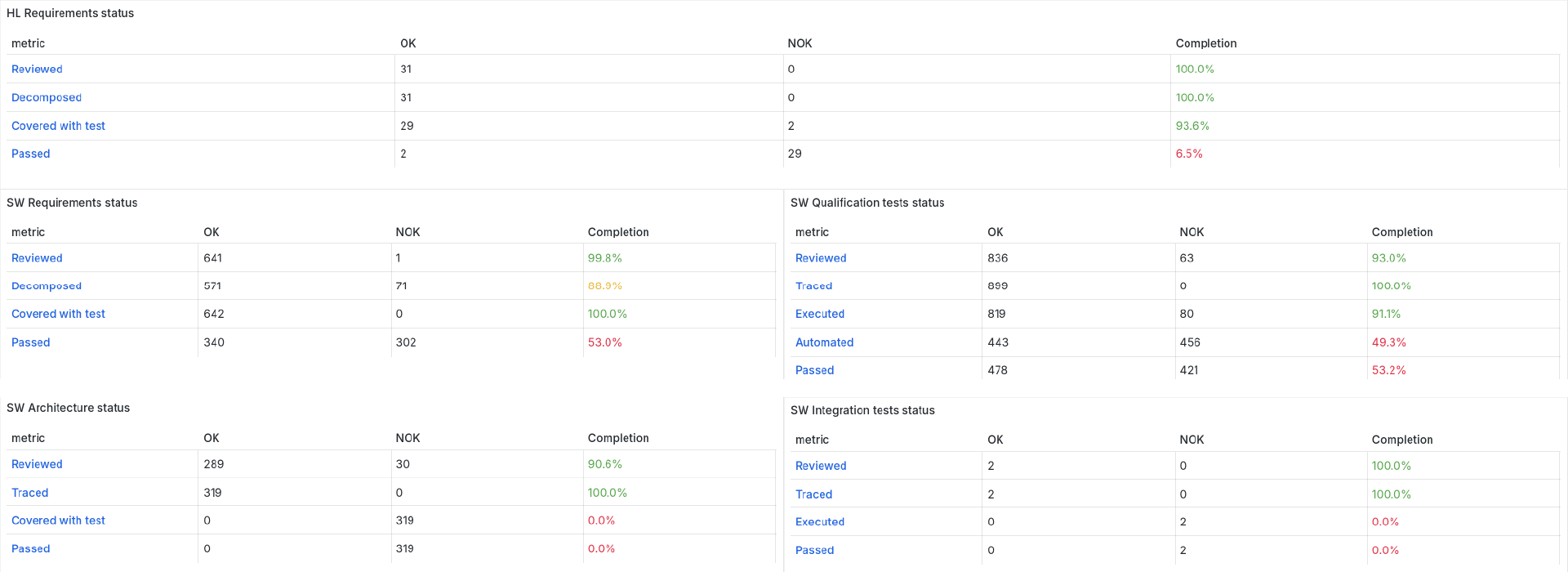
The Traceability Dashboard provides a clear overview of how requirements progress through the development lifecycle - from definition to successful validation.
It covers all levels of engineering, including high-level requirements, software requirements, architecture, and testing, ensuring full transparency of traceability and quality.
What it shows
The dashboard tracks the key stages every item goes through:
- Reviewed – formally accepted
- Decomposed / Traced – linked to the next level
- Covered – verified by architecture or tests
- Executed – tests have been run
- Passed – successfully validated
- Automated – level of test automation (for testing scope)
These metrics together provide a complete view of progress from requirements to verified product behavior.
Each section displays:
- Completion (%) as the main progress indicator
- OK / NOK values for detailed status
- Color coding for quick assessment:
- Green – on track
- Yellow – attention needed
- Red – action required
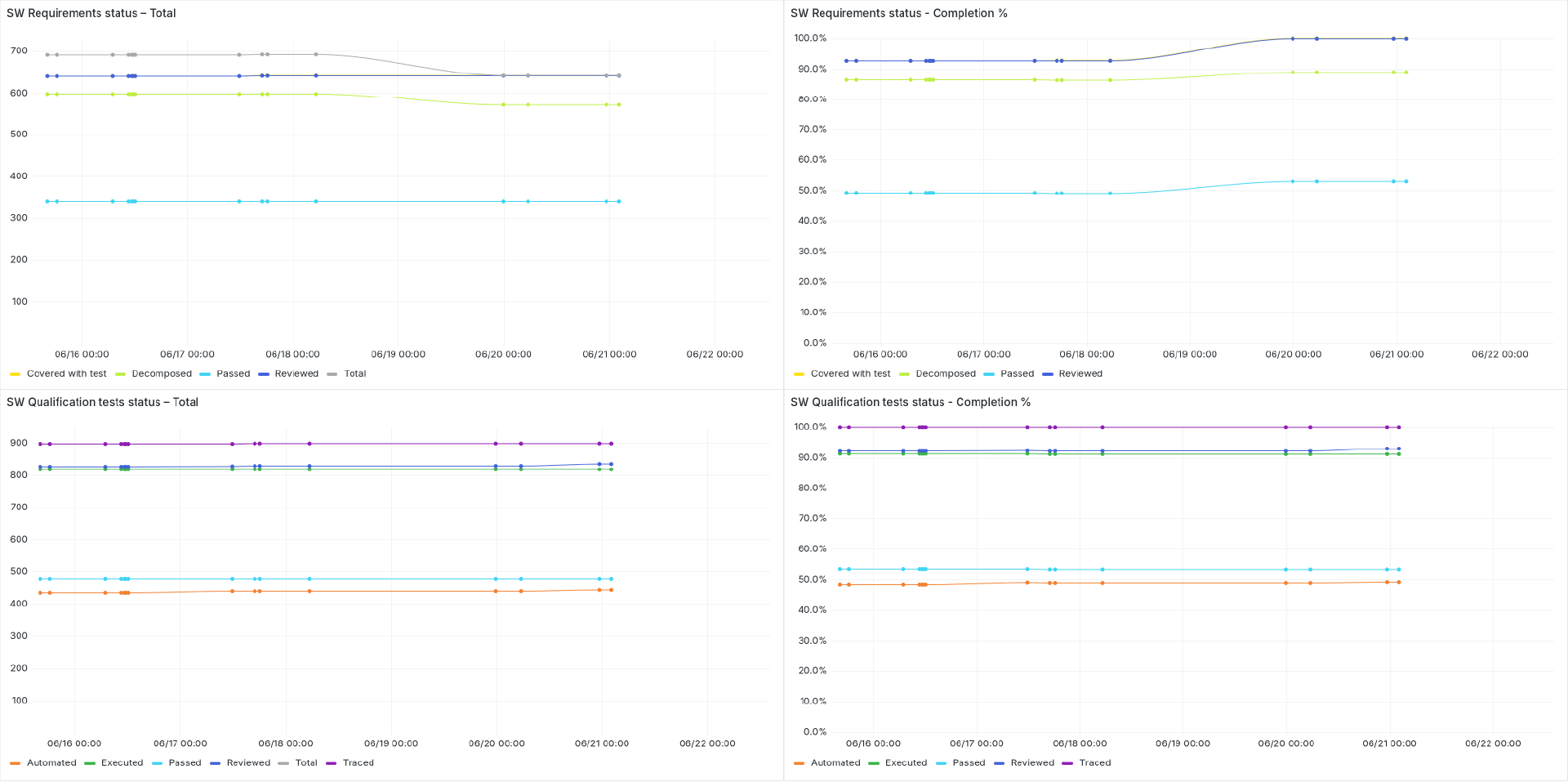
In addition to the current status, the dashboard shows trends over time, helping identify improvements, delays, or risks in traceability and validation.
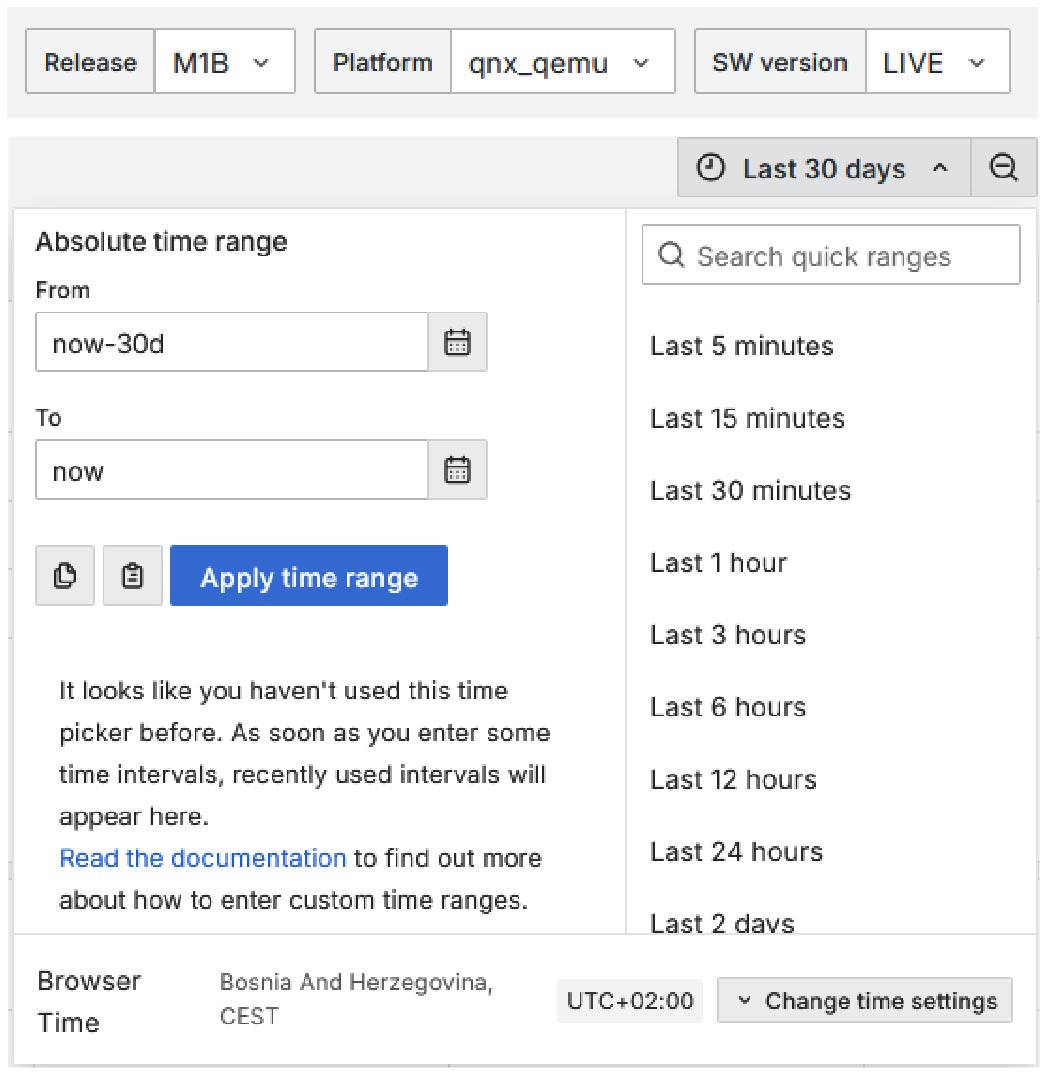
Data can be filtered by release, platform, and software version, allowing users to focus on the exact scope they are interested in. This makes it possible, for example, to view the software status for a specific platform during execution and testing, or to analyze results for a selected subset of requirements tied to a particular release or customer.
The dashboard ensures that every requirement is properly implemented and verified, giving a reliable view of software readiness and supporting confident release decisions.
2. Testing Historical Dashboards
The Testing Historical Overview provides a clear and simplified view of test execution across all testing levels, including qualification, integration, unit, and other test types. It consolidates all results submitted to the database, giving full visibility into testing activity over time.
What it shows
The dashboard captures the complete history of test results, reflecting every recorded outcome across different test types. It also detects regressions between testing cycles, making it easier to identify newly introduced issues and track stability over time.
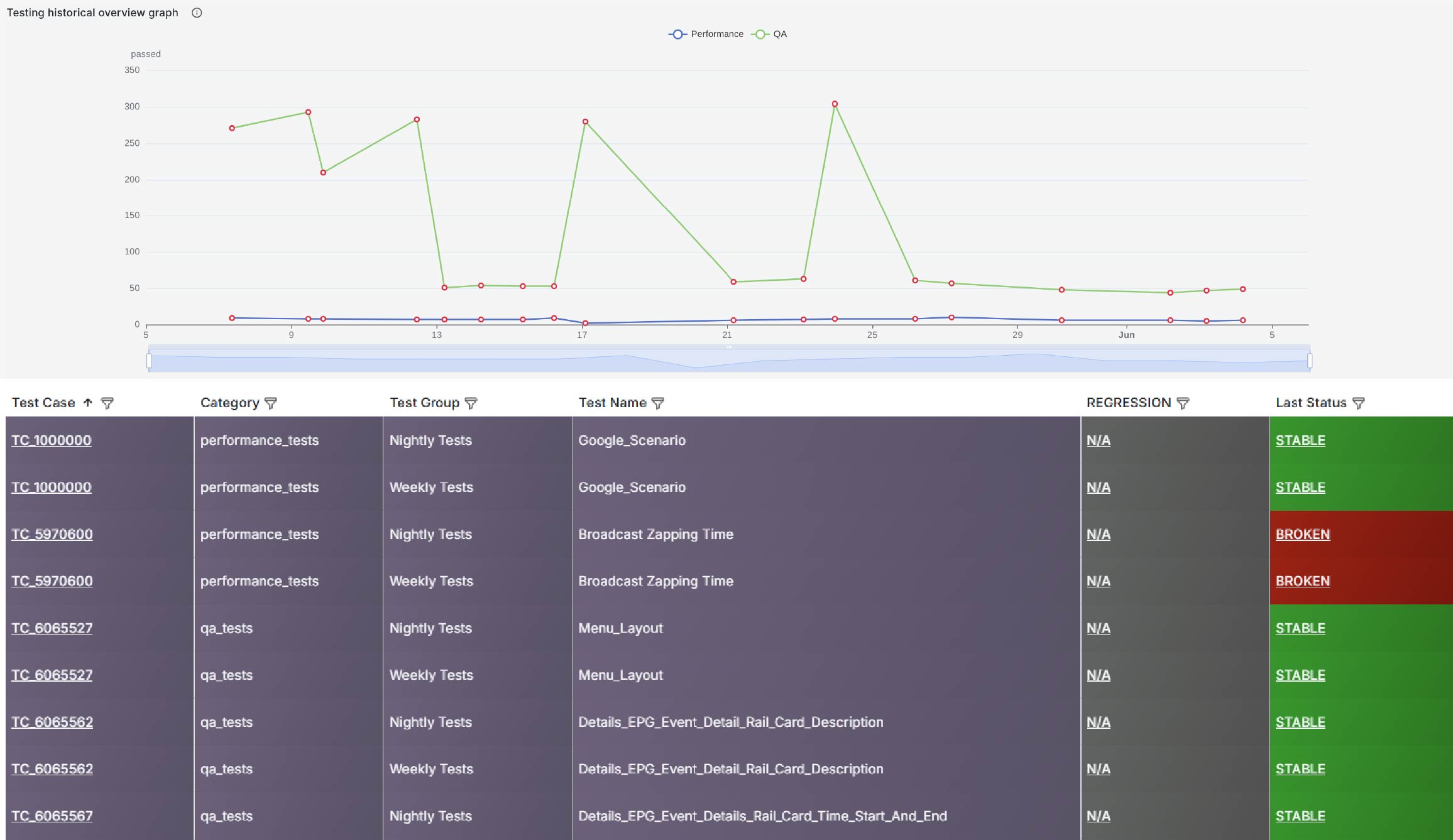
Each view presents the current and historical status of tests, along with clear indicators of success, failure, and instability. Regression markers highlight where previously successful results have degraded, helping teams quickly pinpoint problem areas.
Users can filter the data by platform, scope, software version, and test type, allowing them to focus on a specific subset of interest. This enables targeted analysis, such as reviewing results for a particular platform during testing, or isolating a defined scope of tests for a specific release or customer.
By providing a complete and transparent history of test execution, the dashboard helps teams monitor product stability, quickly detect regressions, and make informed decisions based on real testing data.
3. Engineering KPIs Overview
The Engineering KPIs dashboard provides a comprehensive, DORA-driven view of software engineering performance, combining development, integration, testing, and delivery metrics into a single, unified perspective.
It is designed to monitor the efficiency metrics of end-to-end software development process, helping teams identify bottlenecks, improve flow efficiency, and continuously optimize engineering practices.
What it shows
The dashboard consolidates key engineering indicators across the entire pipeline, from code creation to validation and feedback. It provides visibility into:
- Development velocity and efficiency
- CI/CD pipeline performance and stability
- Code quality and unit test test coverage
- Traceability and process compliance
- Feedback availability and developer experience
Together, these metrics reflect both delivery performance and engineering quality signals, enabling a balanced view of speed and stability.
Core KPIs
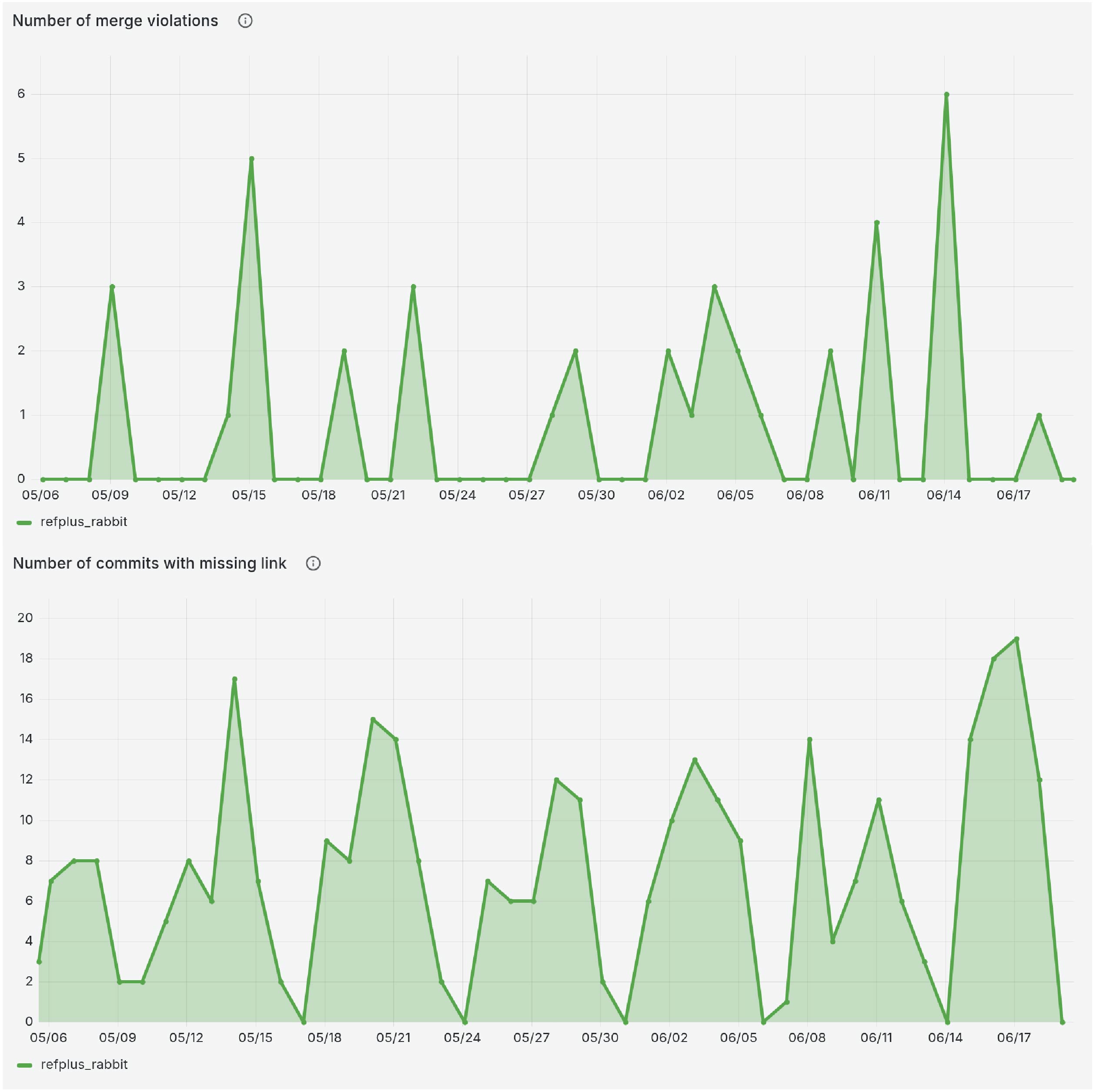
Detected Incidents
- Number of merge violations highlights integration issues such as missing CI validation or bypassed checks
- Number of commits with missing linkage exposes gaps in traceability and process compliance
Development Quality Metrics
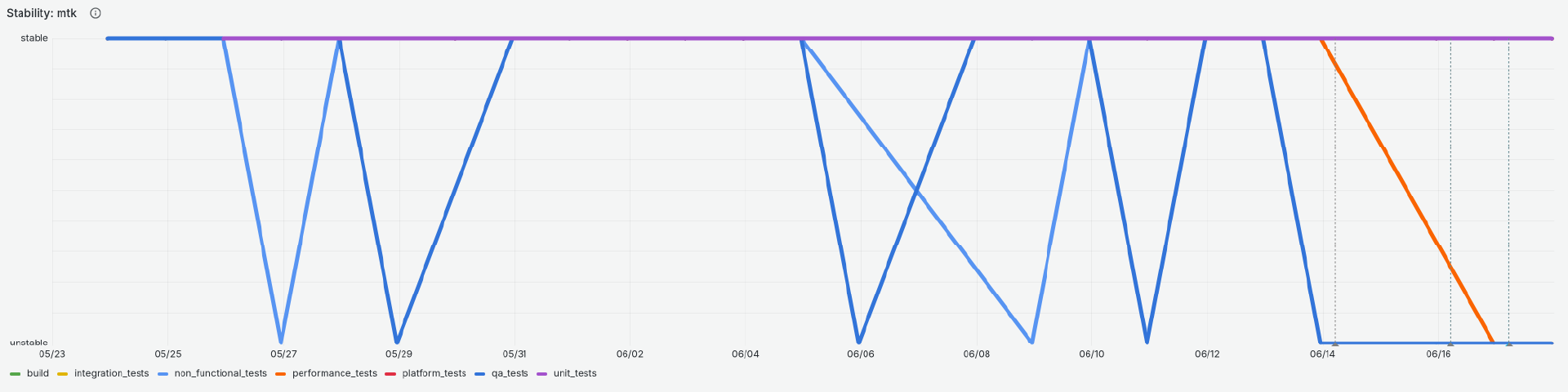
- Pipeline stability per stage, shows for each stage the timeseries of execution results.
- Unit test coverage shows how much of the codebase is validated by automated tests across platforms
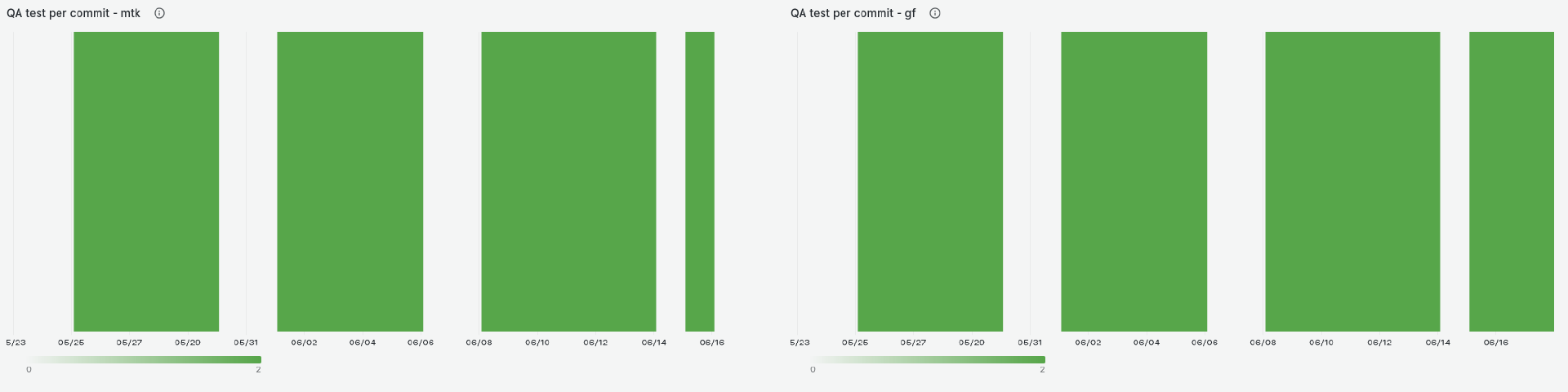
- QA tests per commit reflects the depth and consistency of validation applied to each change
Developer-Continuum Interaction
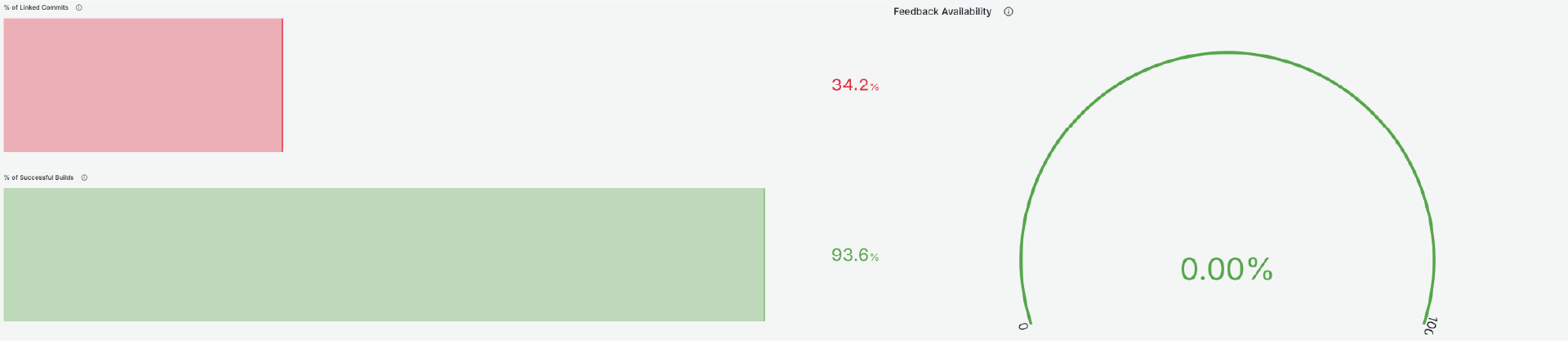
- Percentage of linked commits ensures that changes are connected to requirements or work items
- Feedback availability measures whether commits receive CI results and artifacts for fast iteration
- Percentage of successful builds reflects the stability and reliability of integration pipelines
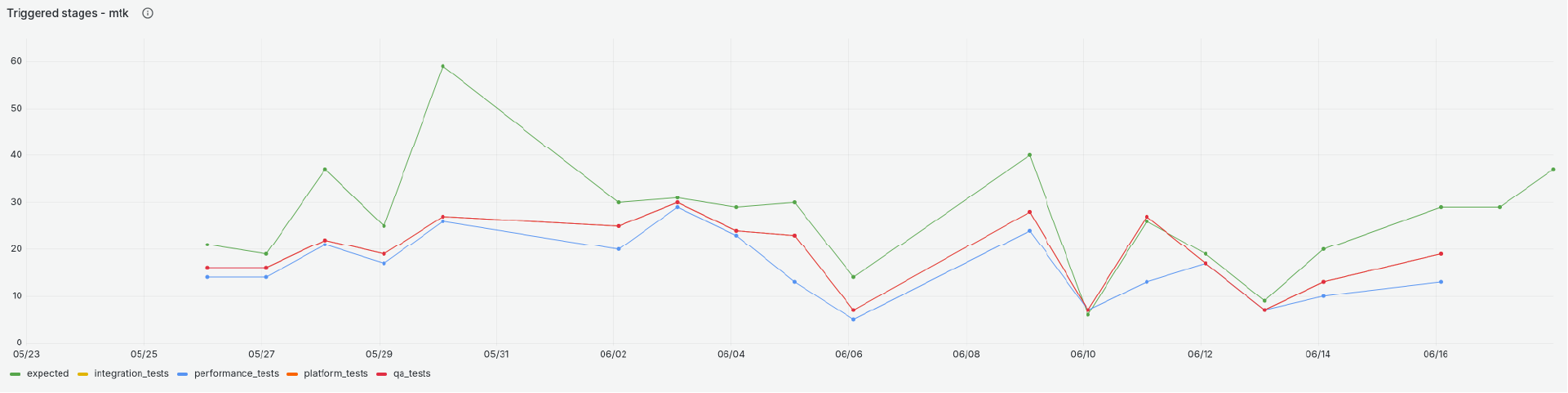
- Triggered stages versus expected stages shows how consistently pipelines execute across platforms
Development Velocity
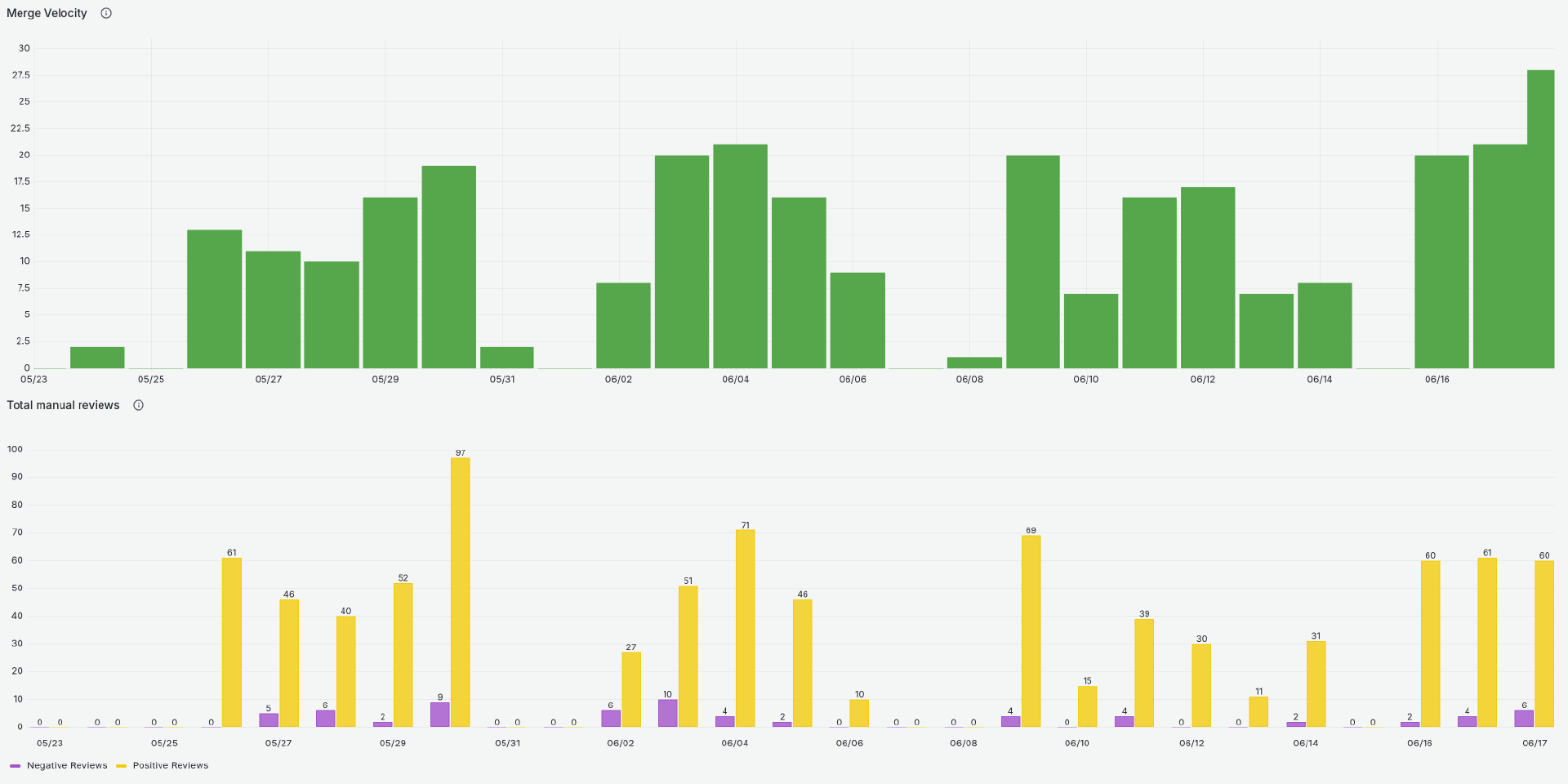
- Merge velocity tracks how many changes are integrated over time, indicating delivery pace
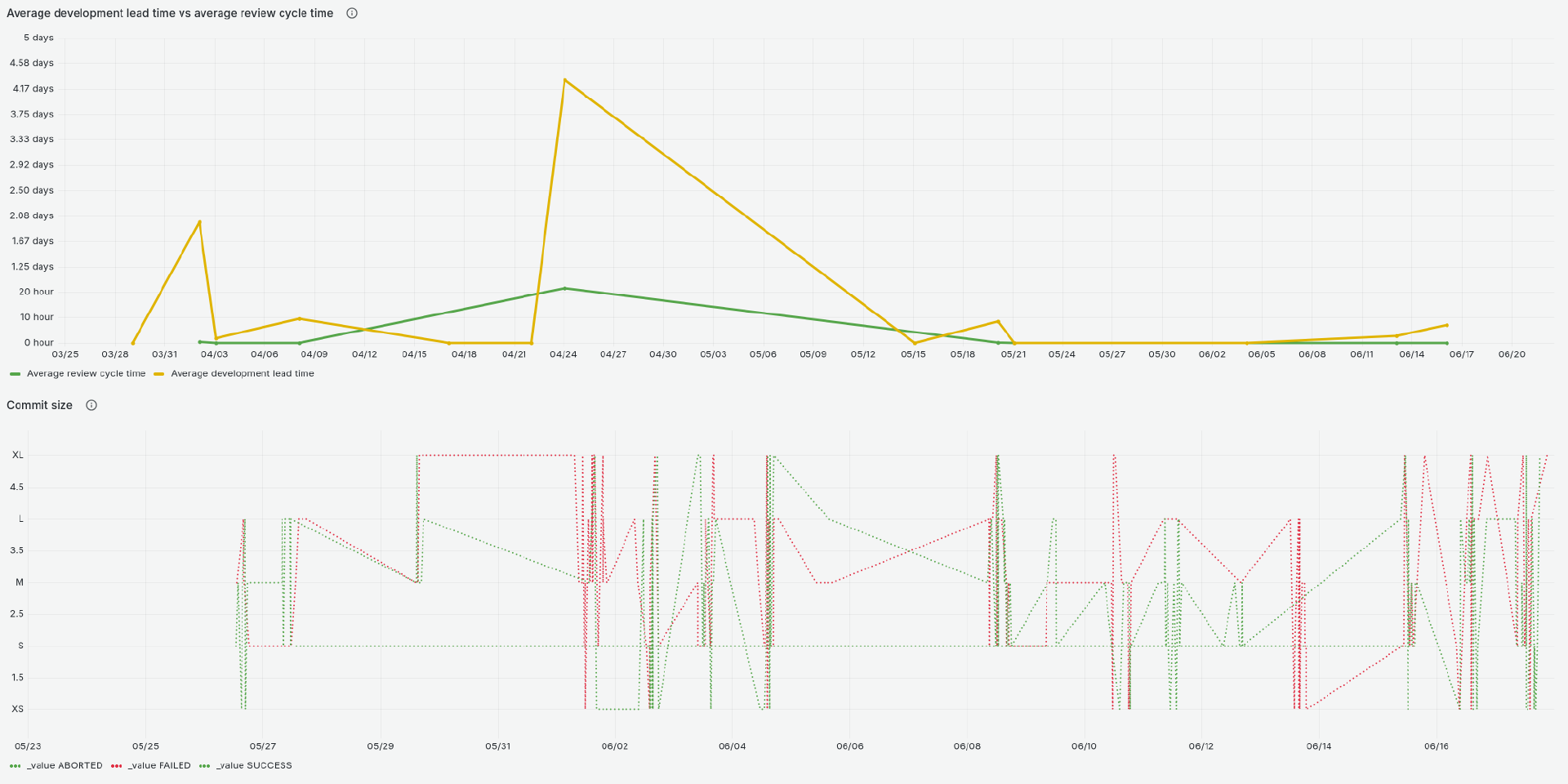
- Development lead time and review cycle time measure how efficiently changes move from creation to merge
- Manual review counts provide insight into review activity and balance between positive and negative outcomes
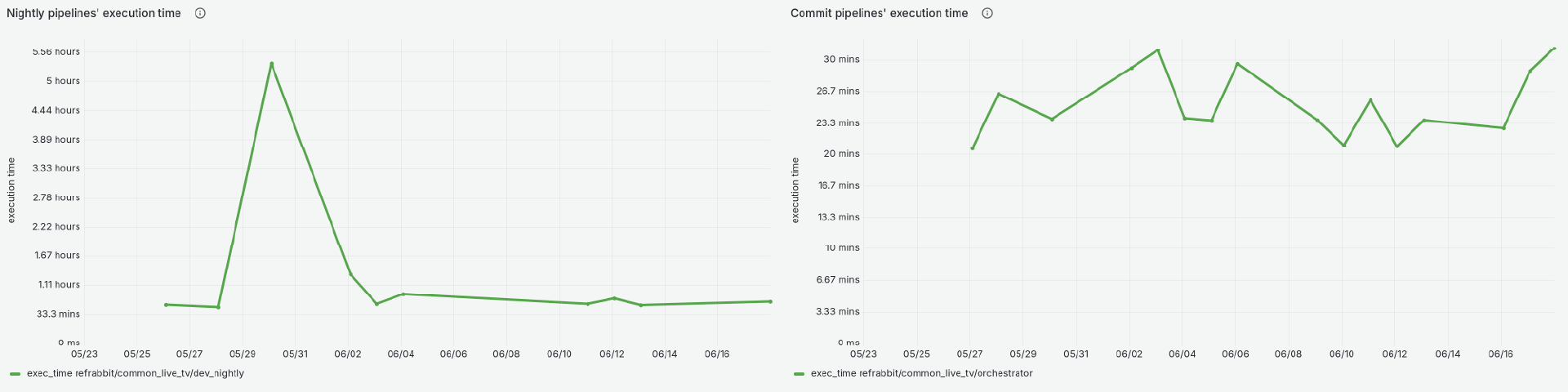
- Pipeline execution time reflects how quickly CI processes complete, impacting developer productivity
- Commit size distribution provides visibility into change granularity and potential risk patterns
The dashboard combines time-series trends, gauges, and distributions to show both current system health and historical evolution.
- Stable systems show consistent pipeline success, fast merges, and high test coverage
- Bottlenecks appear as increased lead times, pipeline slowdowns, or unstable trunk states
- Process gaps are visible through missing links, violations, or low automation ratios
By aligning with DORA principles, this dashboard enables teams to:
- Measure engineering performance objectively
- Detect bottlenecks early across development, testing, and integration
- Improve delivery speed without sacrificing quality
- Strengthen automation, traceability, and feedback loops
Ultimately, it provides a data-driven foundation for continuous improvement, ensuring that all software factors are actively monitored and optimized.
4. System Monitoring Dashboards
System Monitoring Dashboards are part of centralized monitoring system that collects infrastructure metrics, visualizes system state, and automatically reacts to issues when thresholds are exceeded.
The system gathers telemetry from build servers, CI pipelines, and orchestration components. All data is collected into a central monitoring stack where it is:
- stored as time-series data
- visualized in dashboards
- evaluated for alerts
- used to trigger automated actions
What it shows
The system focuses on a few key resource groups:
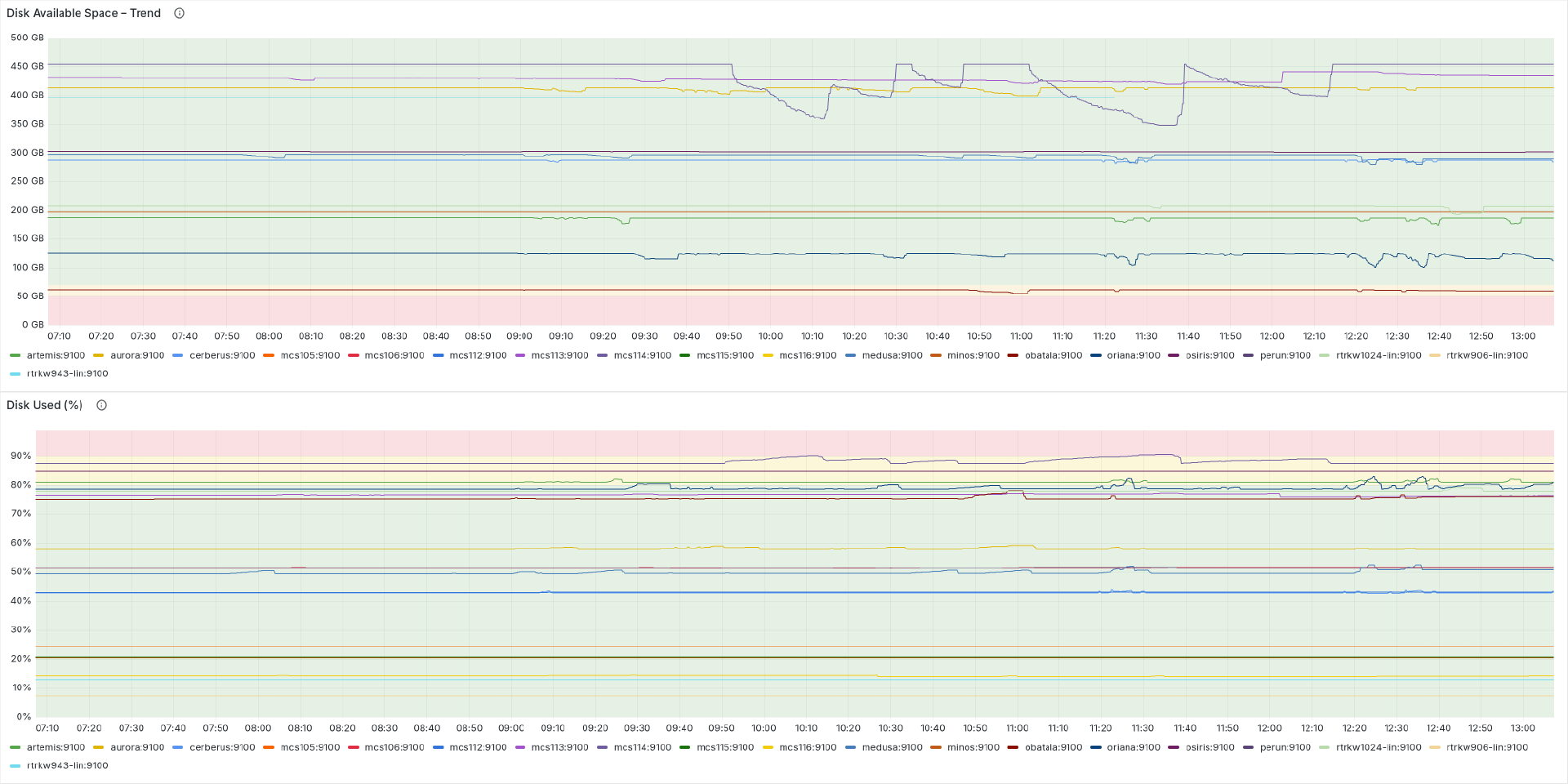
- Disk - Covers capacity, usage, latency, and pressure indicators. Helps detect full disks or slow I/O behavior.
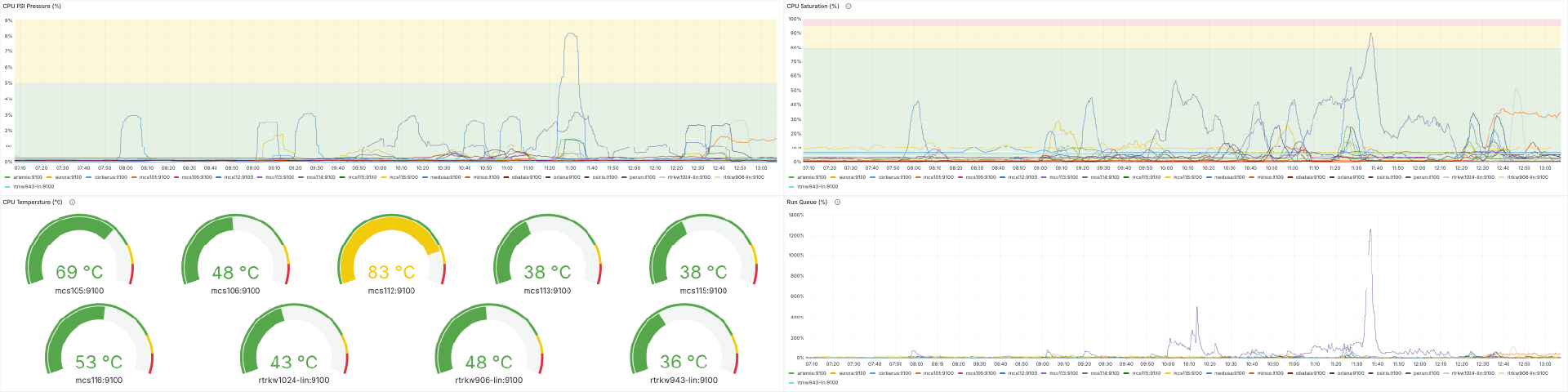
- CPU - Tracks saturation, run queue, pressure, and temperature. Useful for identifying overloaded systems.
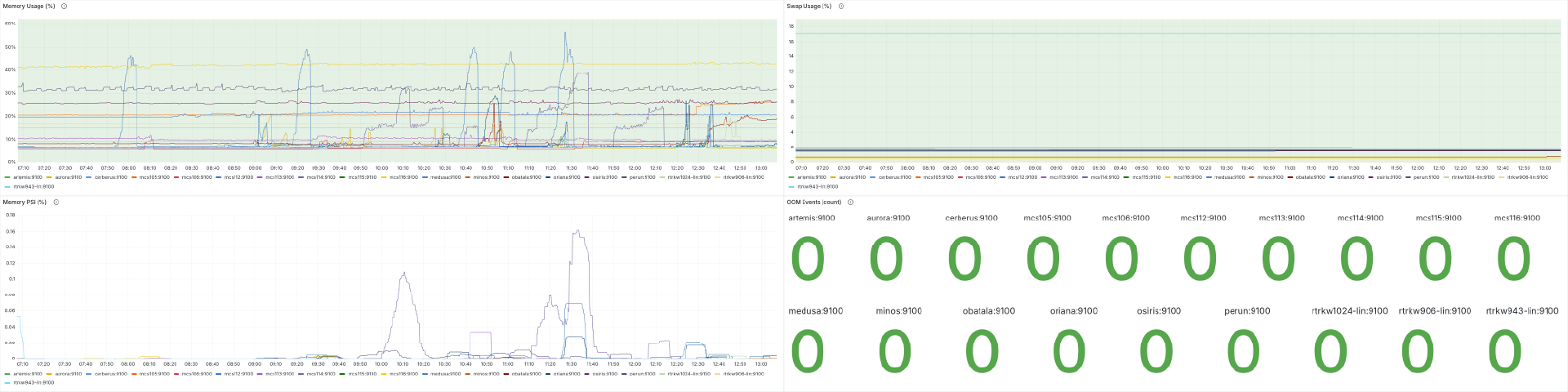
- Memory - Monitors usage, pressure, swap activity, and OOM events. Critical for system stability.
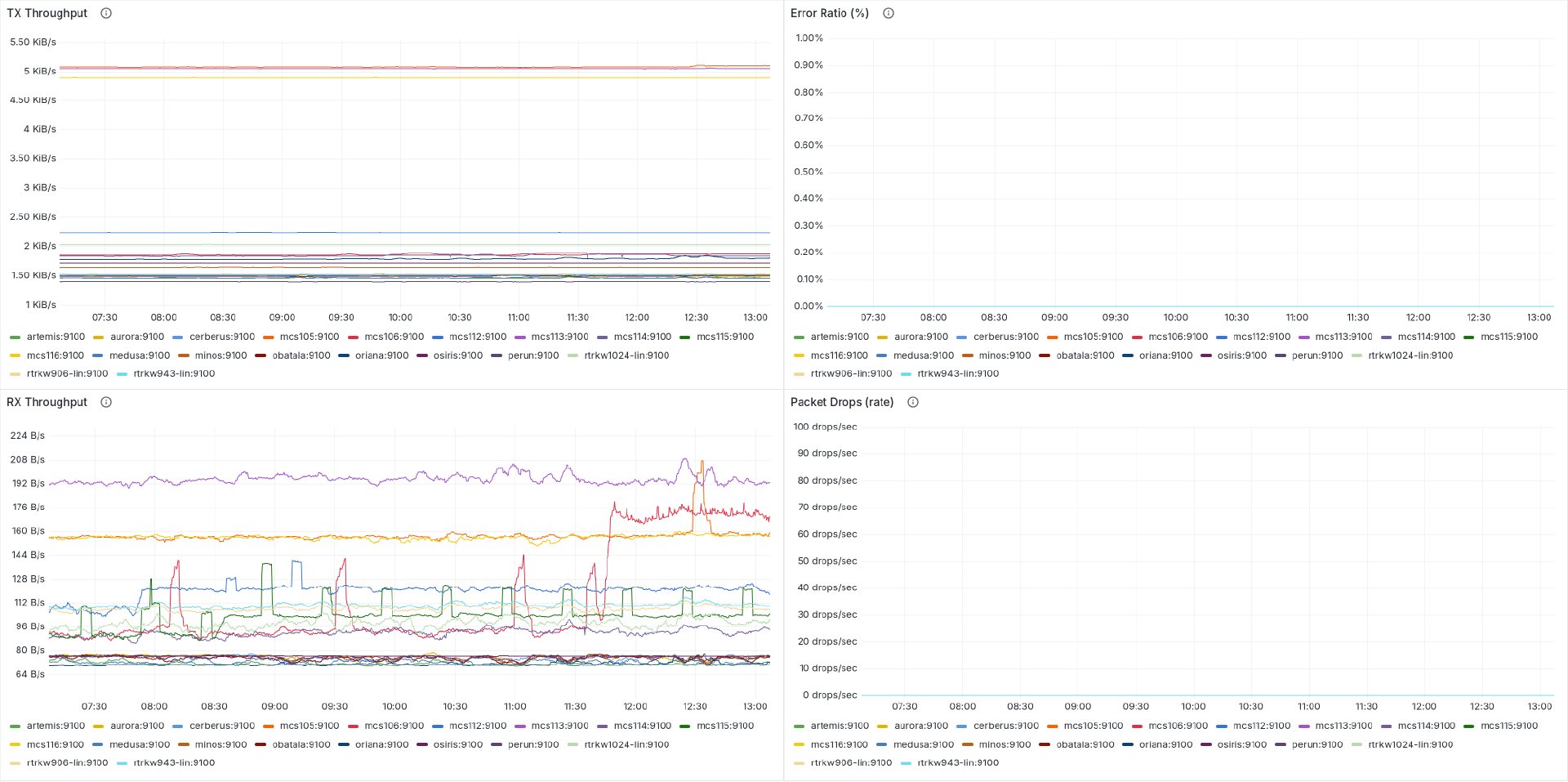
- Network - Includes throughput, errors, and packet drops. Helps detect connectivity or load problems.
- Containers - Provides per-container visibility for CPU usage, memory usage and filesystem utilization
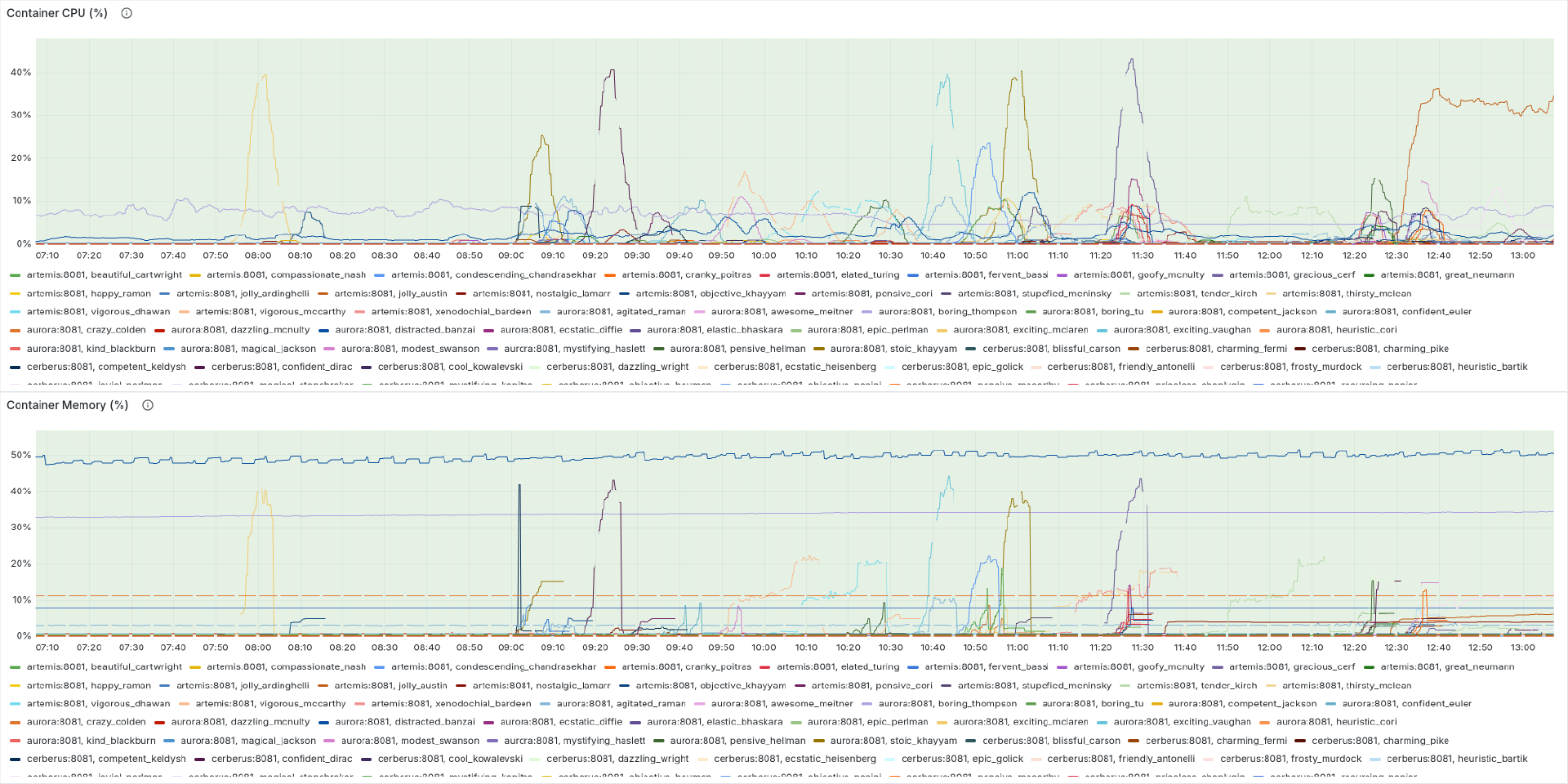
Architecture
The data flow through the system is simple and consistent:
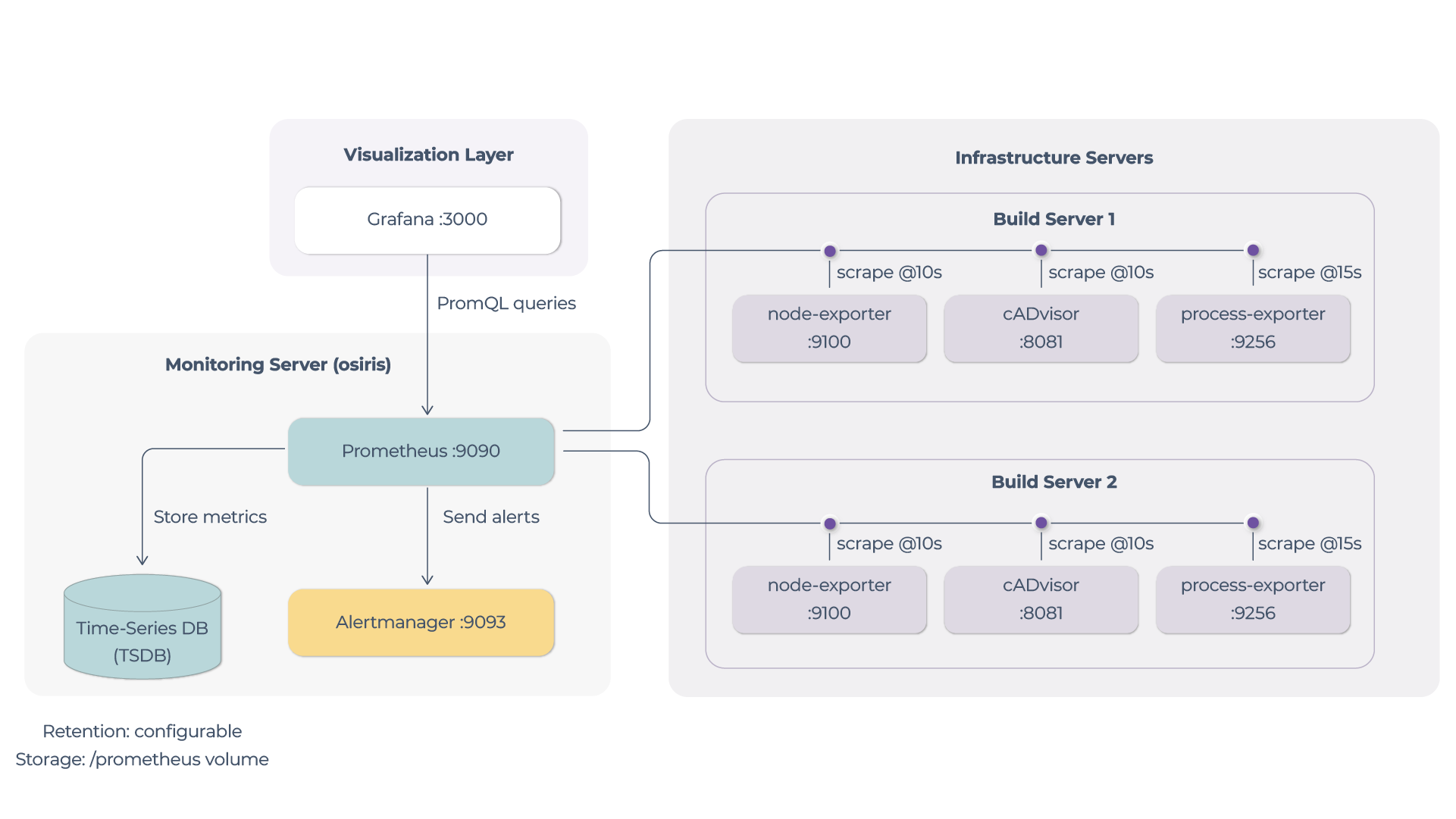
Each machine exposes its metrics using small services:
- node-exporter → system metrics (CPU, memory, disk, network)
- cAdvisor → container metrics
- process-exporter → process-level metrics
They provide HTTP endpoints that Prometheus scrapes regularly. Prometheus acts as a central component responsible for pulling metrics periodically, storing them in a time-series database, executing queries using PromQL and evaluating alert rules
Grafana is used for visualization:
- builds dashboards on top of Prometheus data
- shows both live and historical metrics
- allows filtering by instance or metric labels
Alertmanager processes alerts generated by Prometheus:
- groups similar alerts
- removes duplicates
- routes them to downstream systems
Alerting, Whatchdog and Automation
Alerting is responsible for detecting issues and delivering them to the correct system.
Prometheus continuously evaluates metrics against predefined rules such as high CPU usage or low disk space. When a condition is met, it creates an alert.
This alert is sent to Alertmanager, which organizes and routes it further. The Alert Dispatcher then determines which machine is affected and forwards the alert to that specific target.
At this point, the alert already contains enough context to trigger a concrete action on the right machine.
The Watchdog is responsible for executing actions on the machine that received the alert.
Each server runs a Watchdog service that listens for incoming alerts. When an alert arrives, the Watchdog checks a predefined mapping to decide what action to take.
The mapping follows a simple structure:
- alert_name → function → command
The system is designed not only to detect issues but also to resolve them.
Typical flow critical issue is detected:

By introducing centralized, Prometheus-based monitoring, this system enables teams to:
- Gain real-time visibility into infrastructure health across all machines
- Detect performance issues and resource bottlenecks early
- Reduce response time through automated alerting and routing
- Minimize downtime with built-in self-healing actions
Ultimately, it provides a reliable, data-driven foundation for operating infrastructure at scale, ensuring that system health, stability, and performance are continuously monitored and actively maintained.